Here's The Ultimate Step-By-Step Guide To Filing Your Income Tax For The First Time
The deadline to file your income tax via e-Filing is 15 May 2025.

The income tax season is here, and your days are numbered before the filing deadline on 30 April 2025
This guide is tailored for young adult Malaysians or any first-time taxpayers who are salaried employees under Monthly Tax Deductions (MTD/PCB).
Although the official deadline for those filing online and under e-Be, which stands for 'individual without business source of income', falls at the end of April, it has been extended to 15 May 2025.
Before we start, here are a few things you will need:
- EA form(s) from the compan(ies) you worked for last year,
- A relatively up-to-date computer with a compatible operating system and browser, and
- If you are a first-time taxpayer, a PIN for e-Filing, which can be obtained online or at any Inland Revenue Board (LHDN) branch.
That said, some of you might not be able to complete the process in one sitting if you do not yet have an e-Filing account (MyTax) or have not received the EA form from the previous employer you worked for last year.
Every employer is legally required to provide you with an EA form, even if you left the company the following year. Failure to do so is an offence under Section 83(1A) of the Income Tax Act 1967.
Therefore, it's best to contact your former employer as soon as possible.
If you think you can skip filing your income tax, be warned — the consequences are severe
According to Section 112(1) of the Income Tax Act 1967, failing to submit an income tax return form can result in a fine of up to RM20,000, imprisonment for up to six months, or both.
If you submit your tax return late, you will be fined an additional 10% of the tax payable.
You are liable to file your income tax if you make more than RM37,333 annually.
While those earning less than RM37,333 annually are not required to file, it is still good practice to do so.
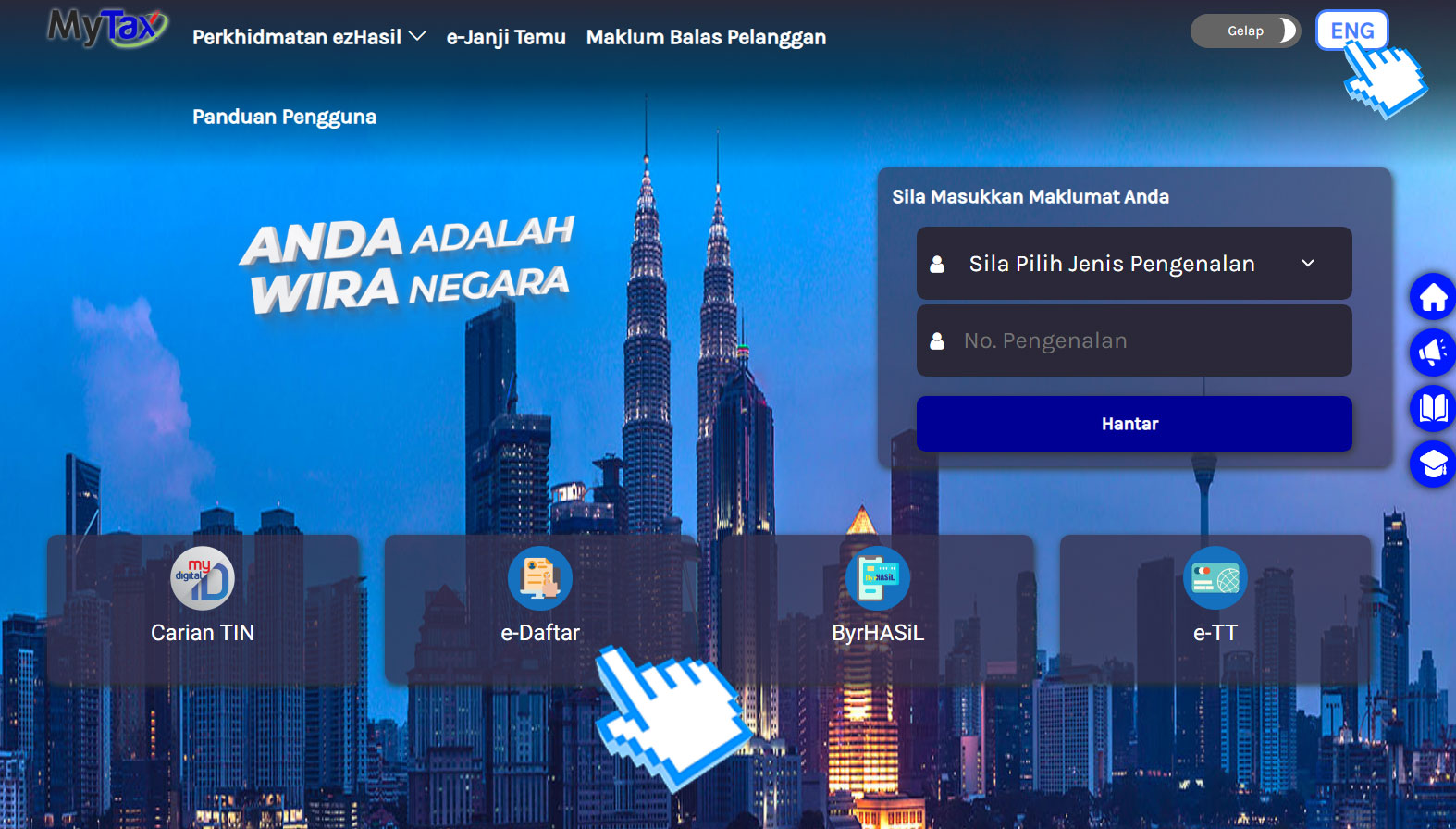
2. Fill in all the required fields
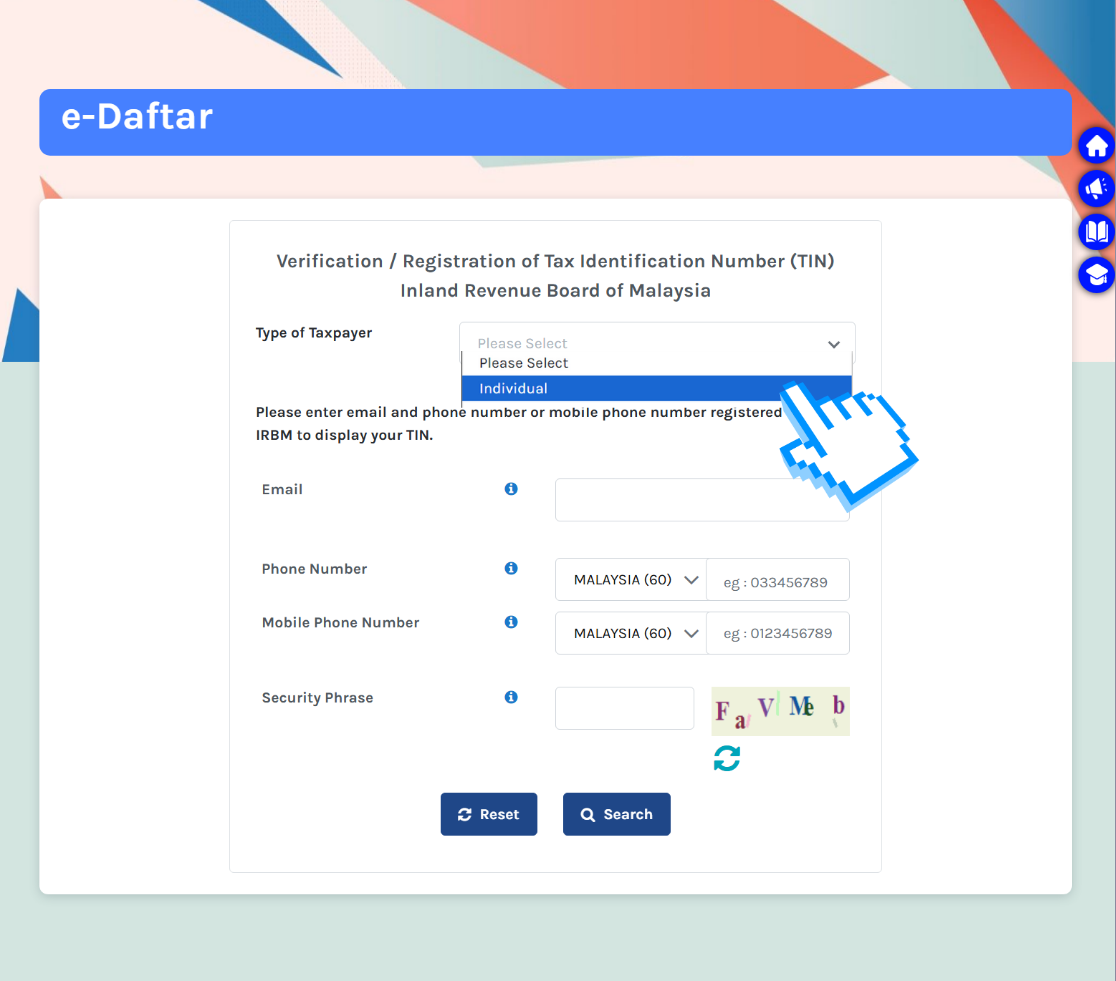
Select 'Individual' for the 'Type of Taxpayer' and complete the remaining details.
Once you are done, click 'Search'. If you do not have an account, you can register and apply for the e-Filling PIN using one of two methods:
– e-CP55D: Apply through the MyTax website
– e-KYC: Use facial identity recognition via the MyTax mobile app
For this guide, we will use the e-CP55D method. Select 'e-CP55D' and verify your email address, identification number, and full name. If the details are correct, click 'Submit'.
A confirmation message will appear, and an activation link will be sent to your registered email address.

This is what the verification email will look like.
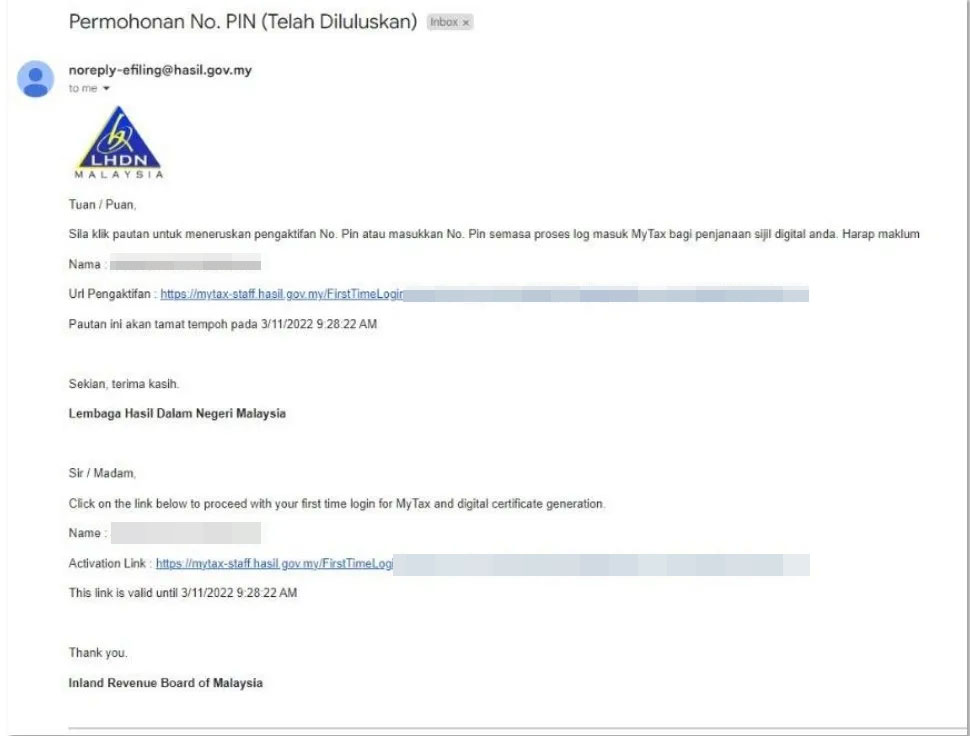
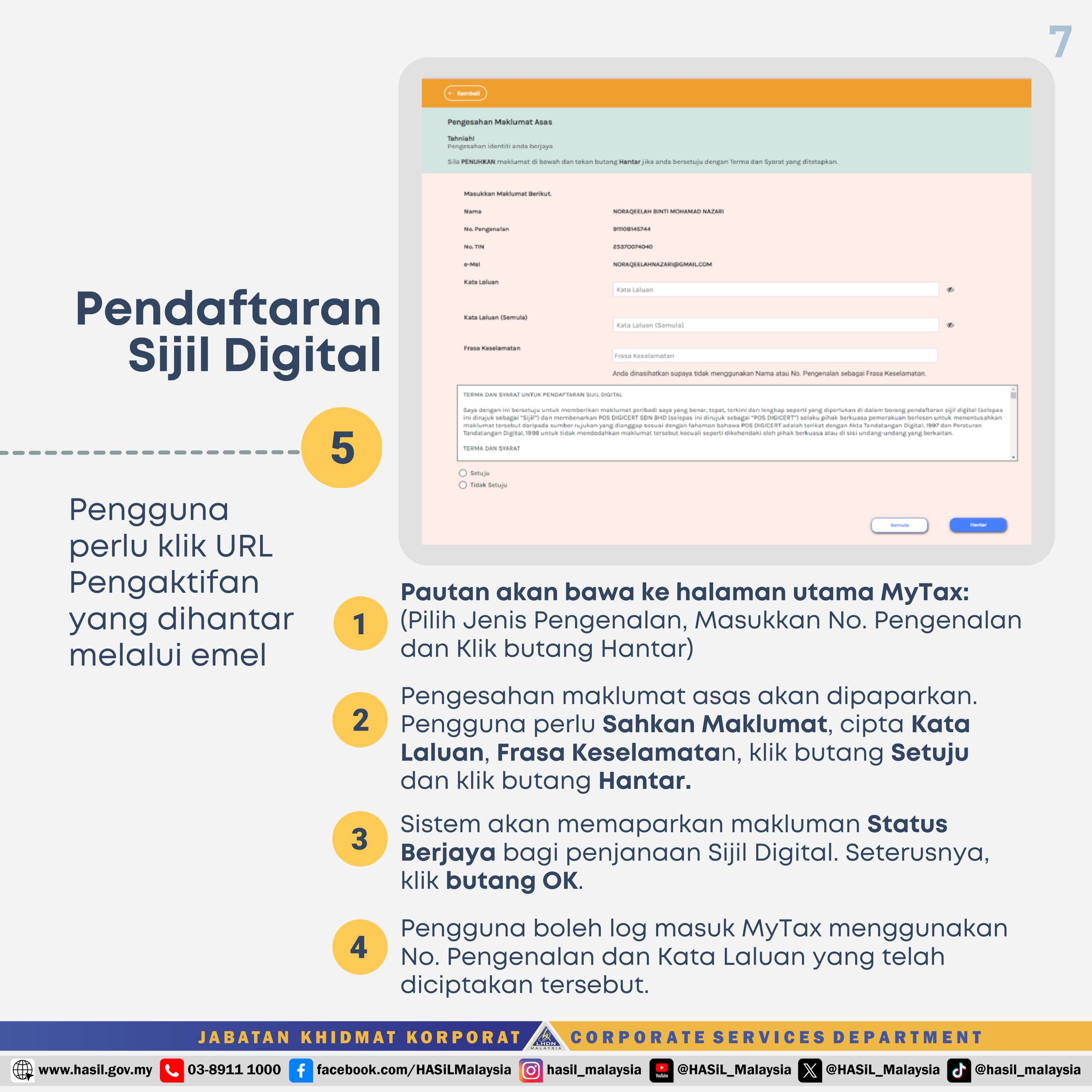
Click the link in the email, which will redirect you to the main MyTax page. Select your identification type, enter your identification number, and click 'Submit'.
Verify the displayed information, then create a password and security phrase. Agree to the terms, and click 'Submit'.
The system will confirm the successful registration of your Digital Certificate. Click 'OK' to complete the process.
Users can now log in to MyTax using their identification number and the newly created password.
Now that you have registered your MyTax account, it is time to log in and start filing your income tax:
3. Once logged into your MyTax account, select e-Filing under the 'ezHasil Services' in the top menu
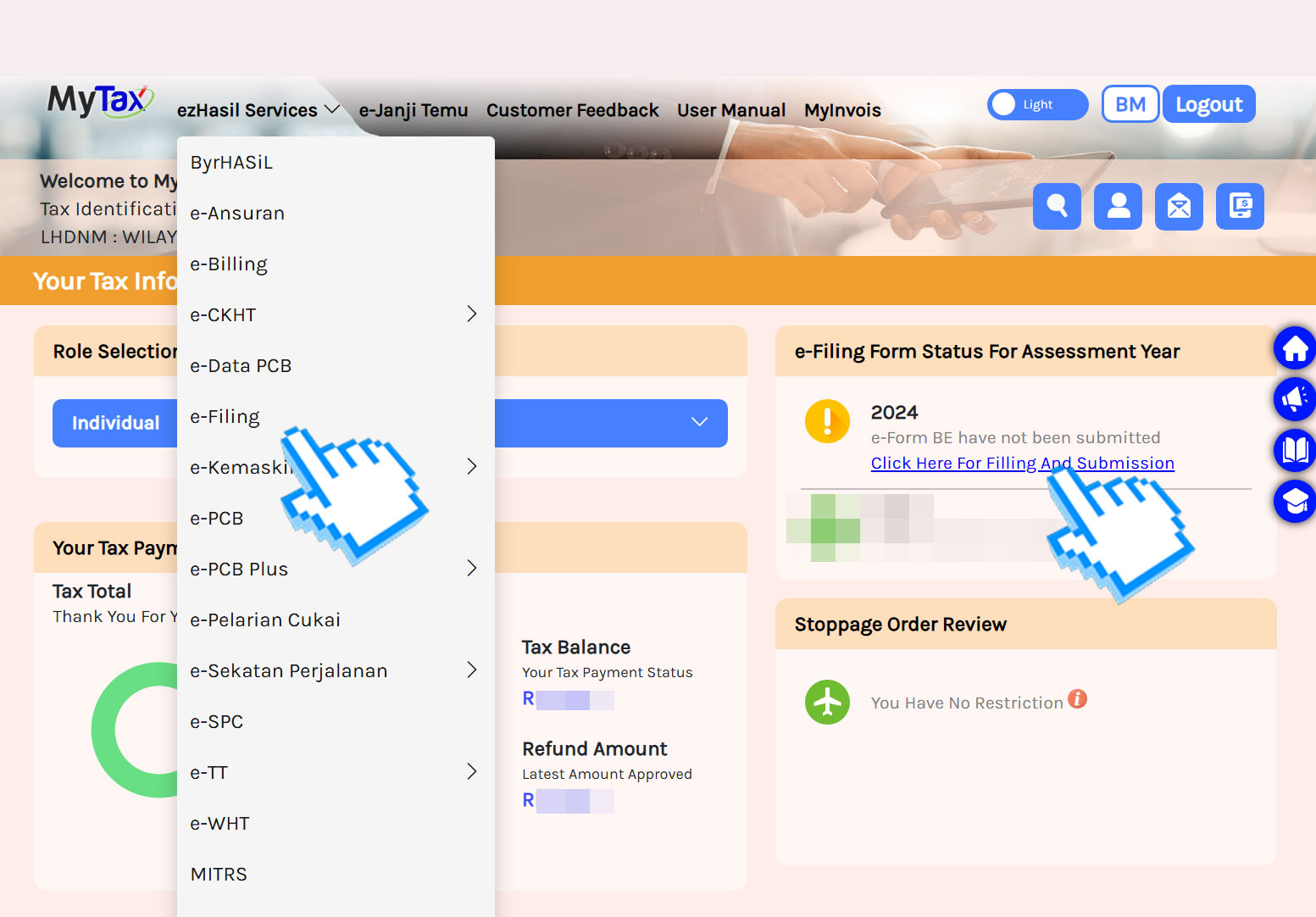
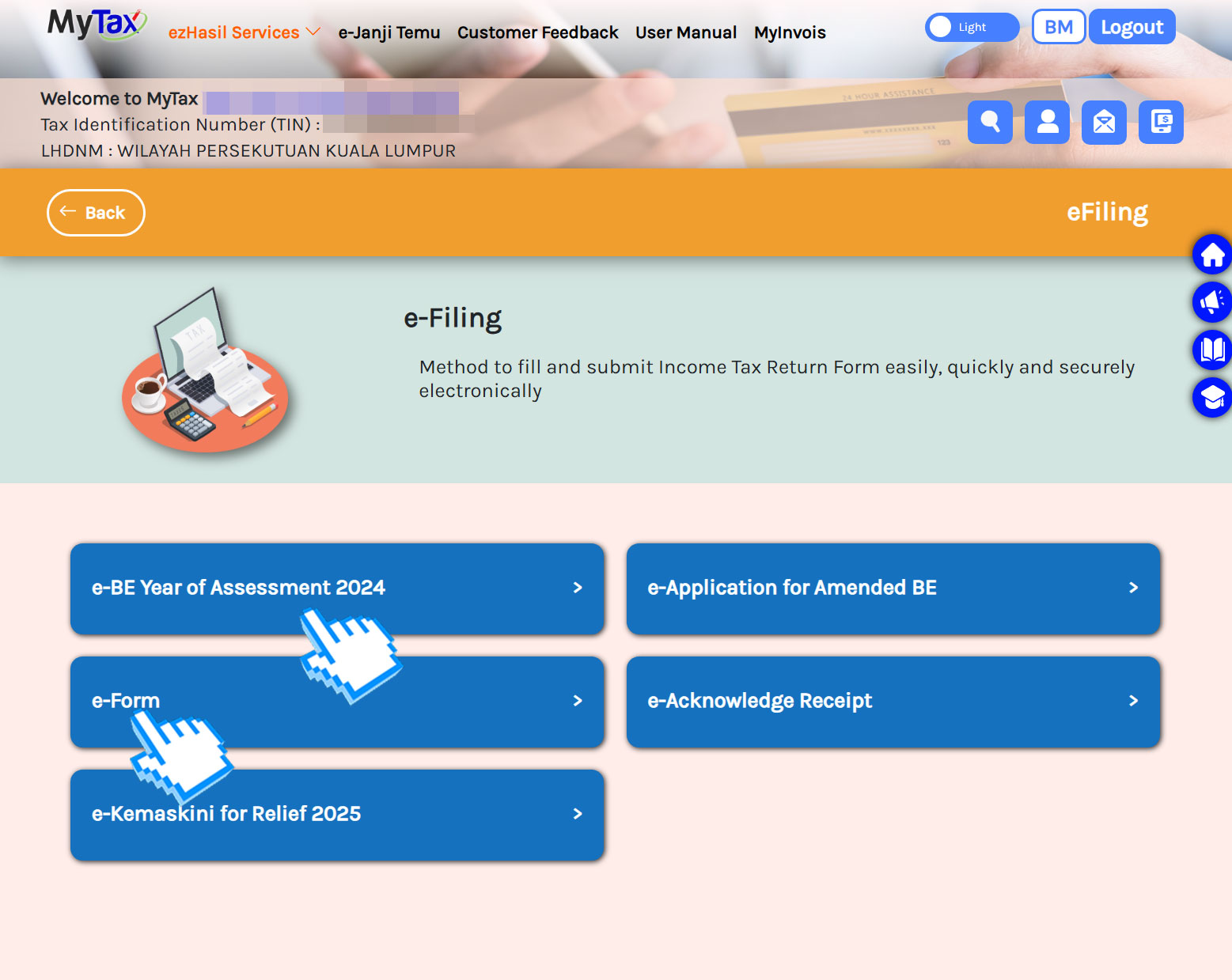
4. Go to e-BE and select 2024 under 'Year of Assessment'

As mentioned earlier, this guide is for Malaysian salaried employees. Therefore, we are selecting e-BE, which stands for 'individual without business source of income'.
If you are not a Malaysian salaried employee (for example, you have a side business or work freelance), select the option that best fits your situation.
From this point onwards, you are advised to enable pop-ups for all LHDN webpages.
5. Fill in your particulars in the first and second sections of the e-BE form
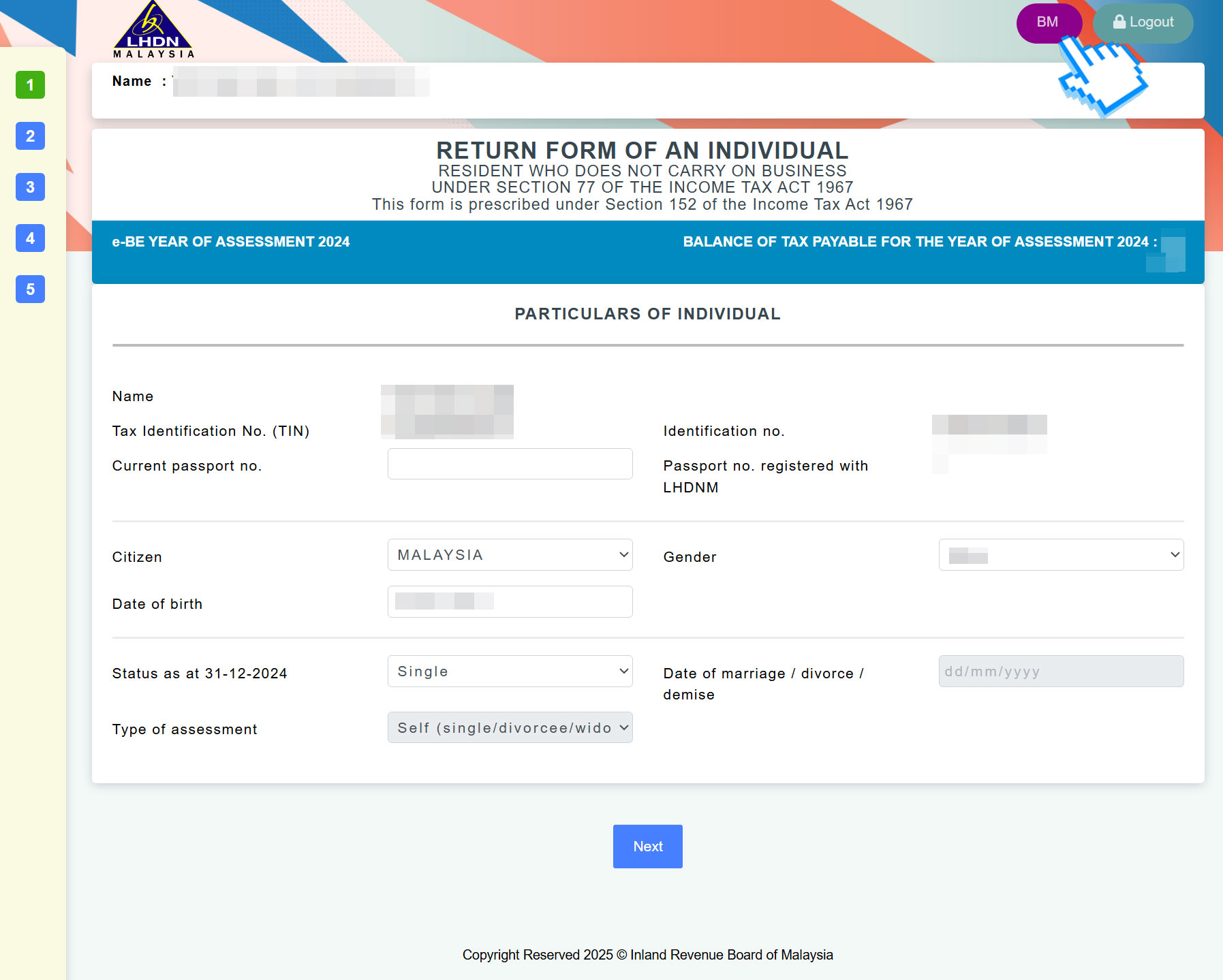
The e-BE form consists of four sections to complete. Remember, you can always toggle the language between Bahasa Melayu and English by clicking the option in the top right corner.
If you are unsure about any column, click 'BE explanatory notes' at the bottom left of the screen. It provides all the information you need.
Before proceeding, look at the top right above the form, where you will see the amount of "Tax Paid In Excess For The Year Of Assessment [last year]". Your goal is to claim back as much of this amount as possible through the tax relief section (fourth section).

Before that, in the second section, you'll need to enter the name of your bank and account number. This allows LHDN to reimburse you any tax refunds after your submission.
Once you've completed your particulars, proceed to the next section by clicking 'Next'.
Note that if you stay idle on this page, you will be logged out automatically. However, all of your input will be saved, and you can resume where you left off by clicking 'e-BE Assessment Year [last year]' on your account homepage.
6. Declare your income

Refer to your previous year's EA form(s) and enter your statutory income. However, you do not have to report the total amount stated in the EA form(s).
For example, if you received perquisites or benefits-in-kind during your employment, these amounts may be exempted from income tax and do not need to be included in your taxable income.
Perquisite / benefits-in-kind income includes:
- Parking allowances
- Medical allowances
- Petrol allowances (exempted up to RM6,000)
- Childcare allowances (exempted up to RM2,400)
- Monetary reward for past achievements, service excellence, or long service (exempted up to RM2,000)
All you have to do is subtract any perquisite/benefits-in-kind income you received last year from your annual income to determine your taxable income.
This step is important as it helps reduce your taxable income. You might even drop into a lower tax bracket, which means paying less tax to LHDN.
Here is how it works:
For example, if your annual income after EPF deduction is RM40,000, and you received:To see the full list of income exempted from income tax, visit here.
- RM1,000 for parking allowances
- RM300 for medical allowances
- RM1,700 for petrol allowances, and
- RM2,000 for an excellence reward
Your taxable income would be RM35,000 after deducting these exemptions.
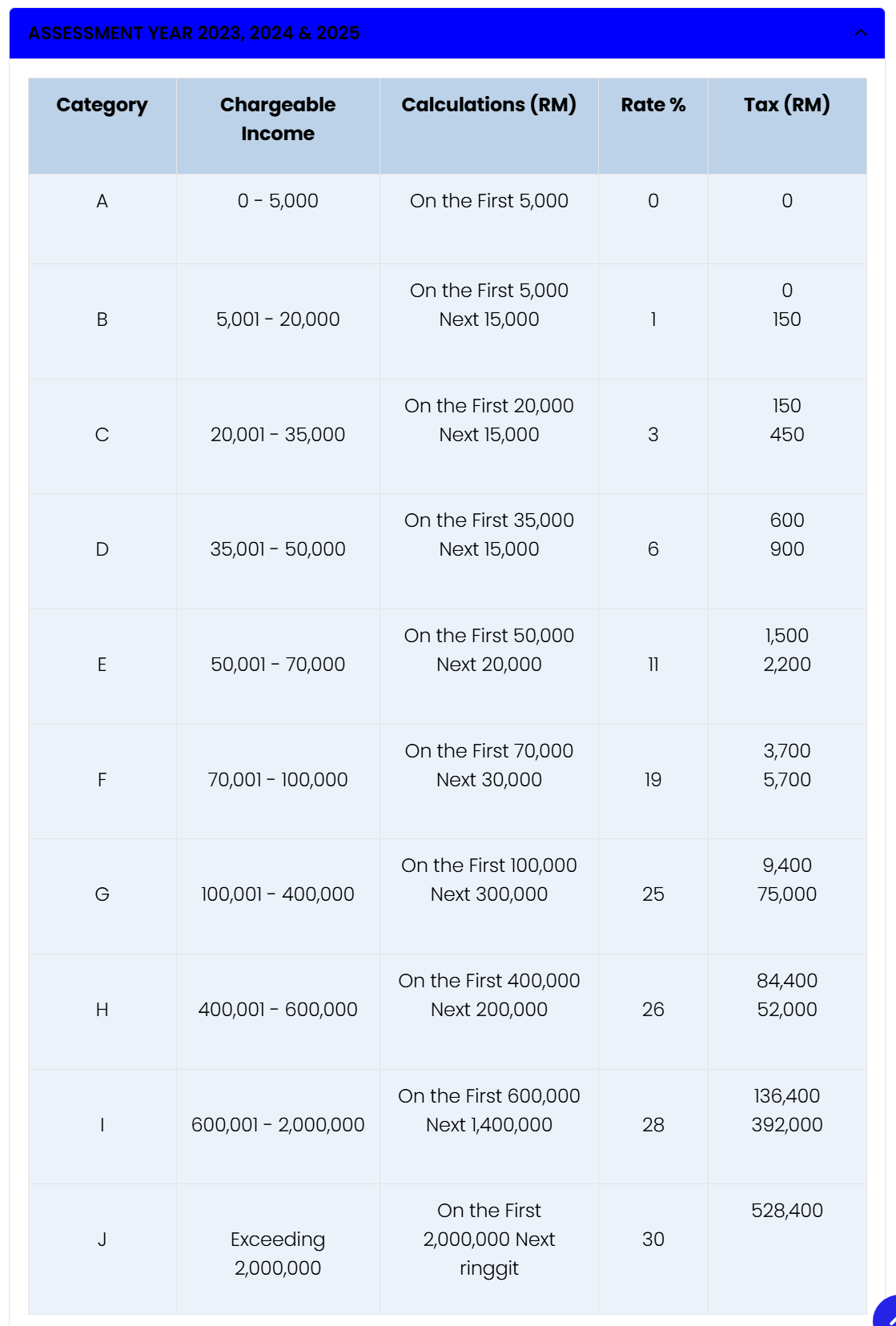
After deducting the tax-exempted items, your tax payable would be RM600 in tax:
- RM150: 1% tax on the portion in the second bracket
- RM450: 3% tax on the portion in the third bracket
You have saved RM300 in payable tax because the RM5,000 exempted income was not declared, preventing it from being taxed under the 6% tax bracket.
Here is the income tax bracket table from the LHDN website:
7. Claim your tax relief

While there are many tax relief options, this guide highlights four popular 'individual tax relief types', as many first-time taxpayers fall within the lower tax brackets.
If you have kept the receipts for computer, smartphone, and book purchases, you can claim them under the 'lifestyle' tax relief.
Purchases of sports equipment, gym memberships, and Internet subscription bills also fall under the same 'lifestyle' tax relief. You can claim up to RM2,500 in this category.
Additionally, if you have life insurance and education & medical insurance, you can claim the premiums under two separate categories, each with a RM3,000 cap.
If neither of the mentioned categories adds up to your payable tax, take a look at your EA form and enter the amount you paid for SOCSO contributions. You can claim up to RM250 in this category.
For the full list of tax reliefs, visit the LHDN website here or read our article here.
So, quickly dig through your emails and find all your electronic invoices. All those bills you have been paying are finally working in your favour!
8. Check your total tax payable or tax return
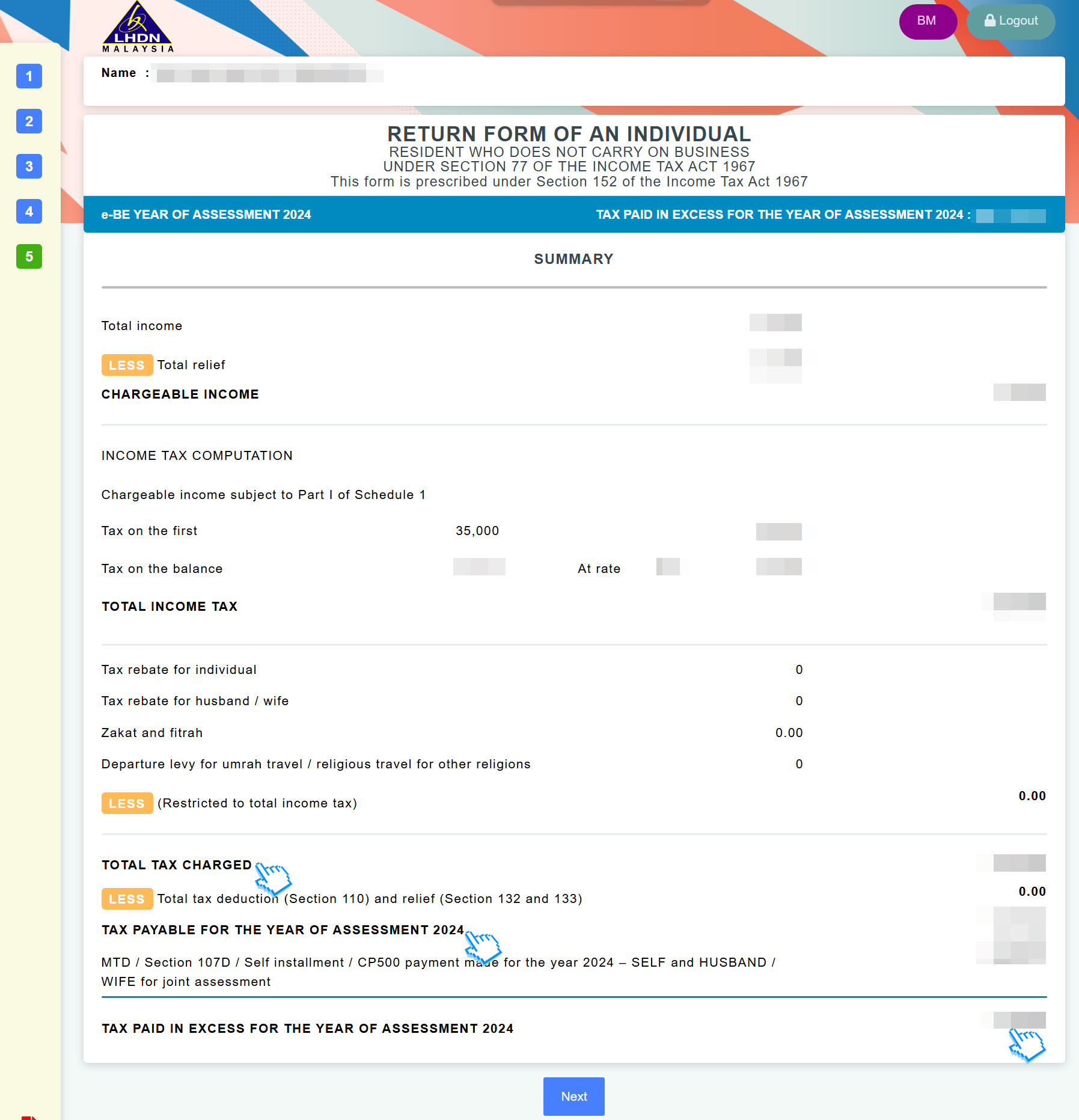
The first blue cursor in the screenshot shows the total tax charged, while the third blue cursor shows the tax return amount if you are under monthly tax deductions (MTD/PCB).
Once you are done, click 'Next'.
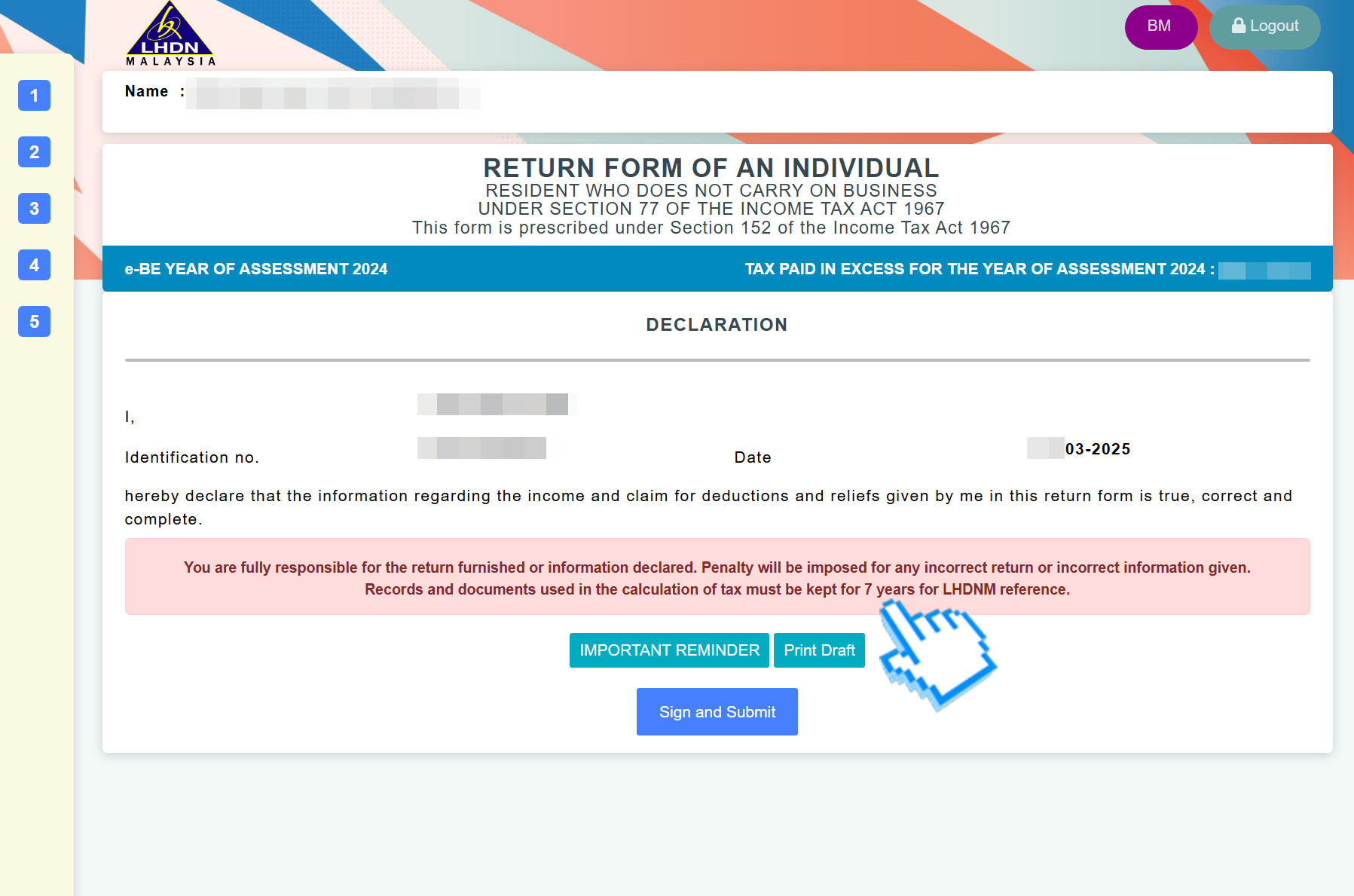
The final step is to declare that all the information provided is true. Then, click 'Sign and Submit' to electronically sign and submit your e-BE form to LHDN. It is recommended to click 'Print Draft' and save it as a PDF for future reference.
Voilà, you are done!

